
Traceability is dead, long live traceability
The Atlassian suite that includes Jira and Confluence enables traceability as a super-power for agile teams.
Jira Xray Tutorial: Discover how the Xray add-on can provide an easy approach for agile delivery management with Jira. Plus a rare opportunity to hear me rave about a tool!

High performing teams chew through a ton of work sometimes even juggling multiple initiatives and priorities. When you add scaled agile delivery to the mix, the delivery management challenges start to become evident. How do you keep track of hundreds of user stories, acceptance criteria, test cases and defects while not losing sight of the releases and business goals?
Thankfully this is where Xray, which calls itself cutting edge test management for Jira, offers some help. Within a few hours of reading and experimentation I was able to create a dashboard in Jira to visualise how my teams are actually performing. These reports have helped my team understand what our focus should be to maintain progress with quality.
Unfortunately this isn't a guide to Xray. The folks behind Xray already have good and useful documentation. The focus of this article is to showcase how some of the recurring delivery management questions could be answered using the reporting that Xray provides. In that sense, you might actually appreciate the insights from these reports even if you do not yet fully use or dig Jira.
Traceability is one of Jira's core strengths. Xray extends it by making it even easier to manage requirements, test artifacts and defects.
Managing Requirements
Xray allows you to configure specific Jira issue types, for example, Story, as Xray Requirements. Features like requirement status, requirement coverage and test case views are then enabled for these issue types. You can also create test cases from within these issue types. More information can be found at the Xray Quick Guide for Administrators.
Furthermore, configuring the Epic as an Xray Requirement issue type allows the consolidation of test management and reporting for all requirements or user stories that are part of the Epic. This can often be a very useful summary view.
As a side note, defining specific issue types as requirements can also help with introducing organisation-wide definitions of how issue types are used and thus bring consistency in their use across all teams.
Managing Defects
Similar to configuring requirements, you can also allow specific Jira issue types - like Bug - to be considered as Defects.
Managing Test Artifacts
Not surprisingly, Xray introduces a whole bunch of new issue types for test management, including
Xray organises tests and test execution in a fairly standard manner using Tests that are created against a requirement. Tests are then executed and tracked using Test Executions with execution statuses such as TODO, EXECUTING, FAIL, ABORTED, and PASS. Defects, if any, are created against Tests.
The key benefit of Xray is the reporting available around requirements and epics. And this reporting kicks in from the moment a requirement or user story is created in Jira. So what are these reporting options?
This is probably my most favourite report because it gives a quick visual view of scope, progress, quality and release readiness in one single view. If you want one chart that could give you confidence or jitters about how your delivery is progressing, no doubt, this is the one!
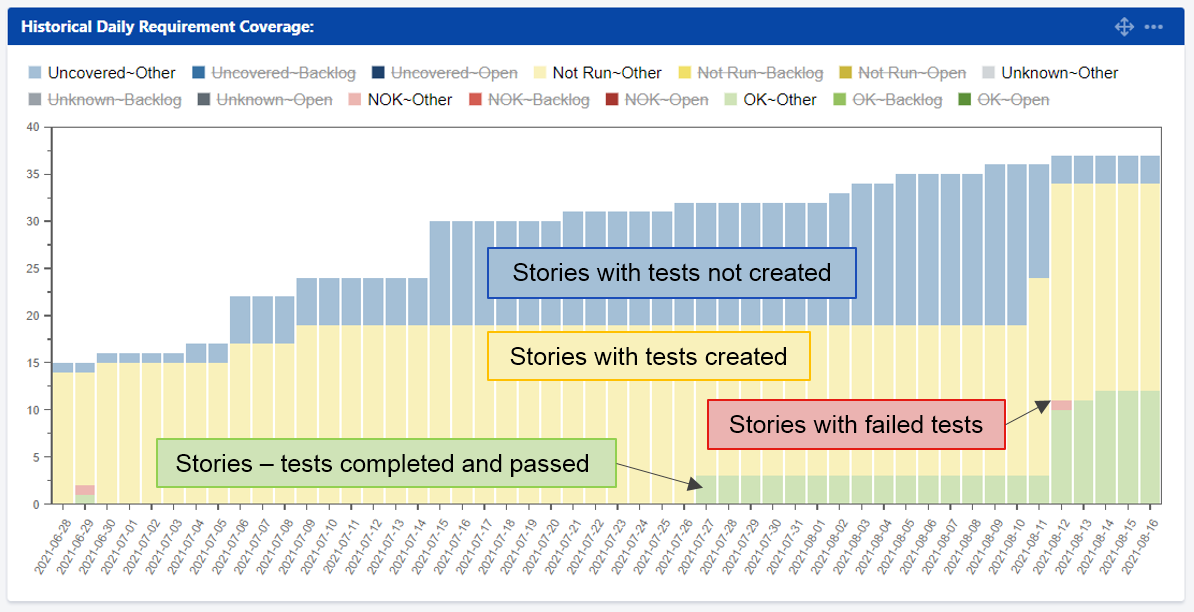
The Historical requirement coverage report charts the requirement status of requirements on a historical basis - pretty much what the name means. It is a good view of how delivery is shaping up in terms of progress and quality.
Green or stories completed and passed are the number of stories for which all tests have passed.
Red or stories having failed tests are what it is. Hope you don't have much of them.
Yellow or stories with tests created are those for which tests have been defined and available. Even if one test is in progress or not executed, your story would be yellow in this report! Thus, it's either done or not done in true agile fashion.
Finally, blue is for stories that have no associated tests. They are often newly created stories that are under elaboration or those for which test artifacts are still being created. The blue portion should give you a sense of how many stories are in their early lifecycle stage.
Now that you know what the colours mean, aren't you keen to know all about the insights the Historical Requirement Coverage Report could offer you?
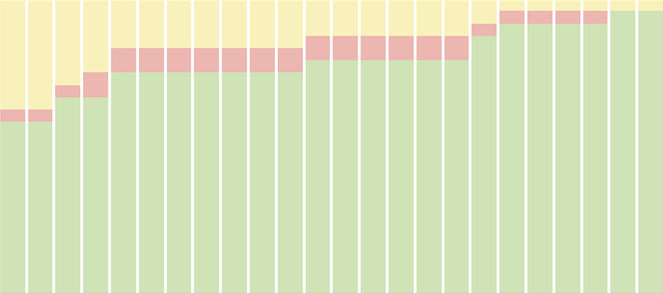
Example of better release readiness
As we get closer to the release the goal would be to have bars that are 100% green which means all your planned requirements are tested and passed. So the following report is an indication that you are almost there in terms of test completion and quality.
Example of being not-so-release-ready
The report below still has lot of yellow very close to planned release. Possible options would be to manage scope or push out the release date. The same approach would be required if there are new stories in red (has failures) or blue (are new)!

Who else thinks that scope creep is inevitable in iterative delivery? Being aware of newly added scope is the first step to managing it. The following report is an example of a bad nightmare just when you are back from a break!
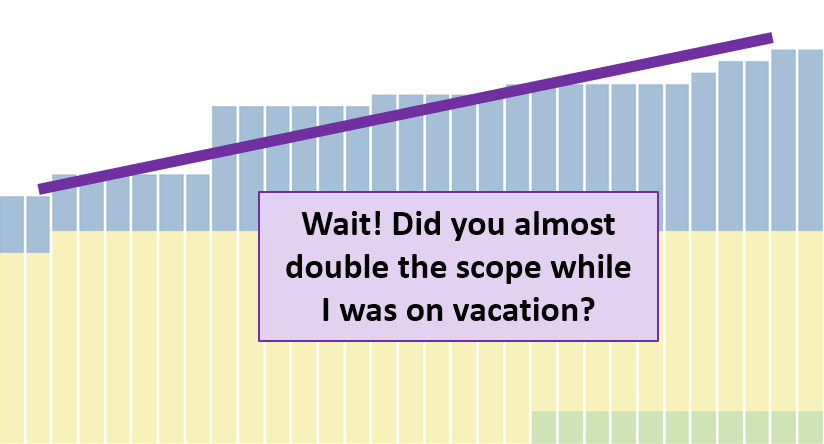
The report makes it easy to spot scope changes because you can see the overall number of stories as well as the blue coloured ones that do not have any tests created.
If the scope is large or complex and if no tests have failed, there may be reason to worry about test coverage or quality of testing. Since the Historical Requirement Coverage report is at the Story level, it can tell us if your failures are isolated to a few stories or if they are everywhere.
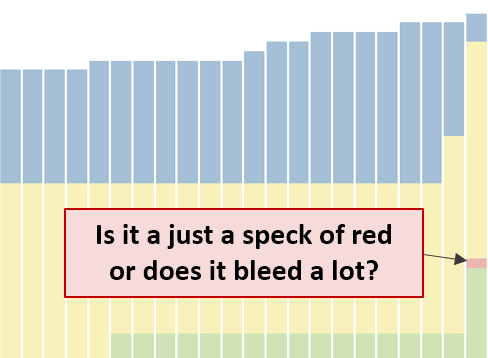
A large blotch of red is a reason for worry and would require a closer look at failures.
Requirements List is the next useful Xray report which could also serve as a drill-down report for the Historical Daily Requirement Coverage.
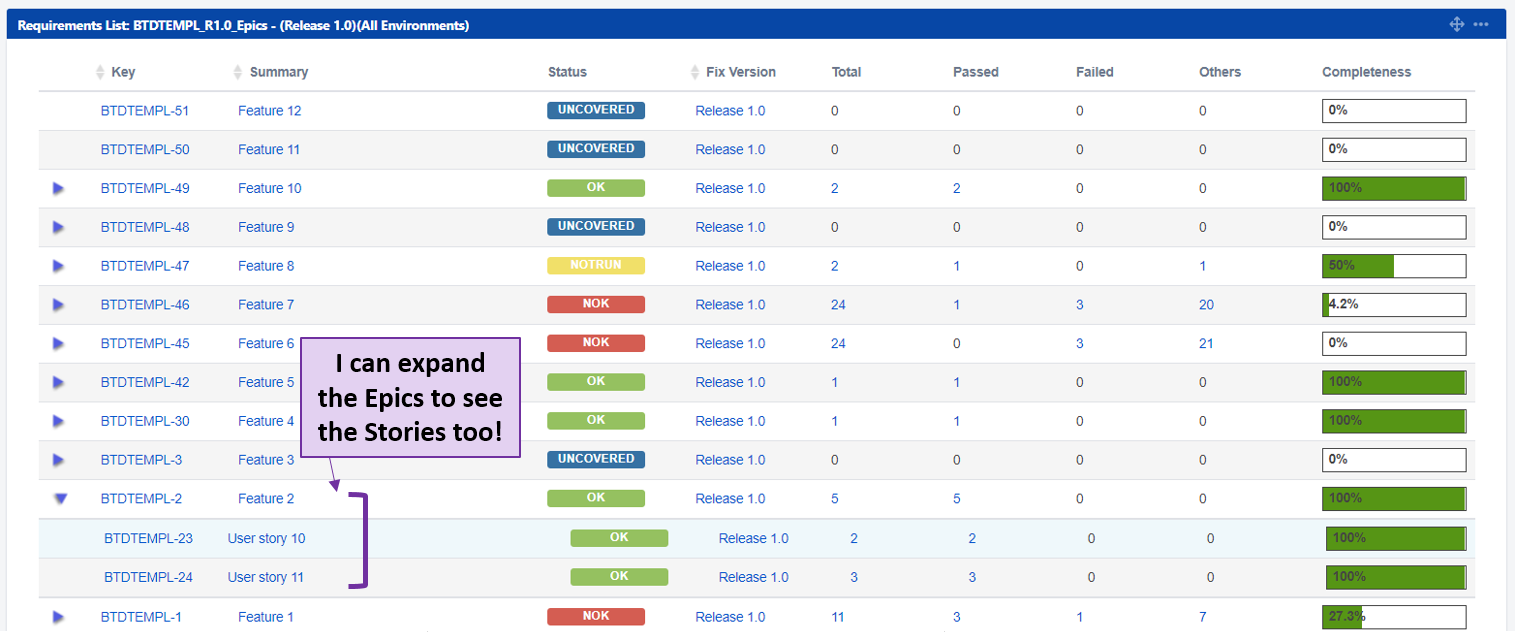
What I like about this report is while it gives a quick view of the consolidated test summary and progress at the Epic level, it also allows to expand the epics and look into the individual stories.
Here are some potential insights the Requirements List report can give to help manage scope.
The ability to peek inside an epic and see the status of all stories certainly allows quicker decision making.
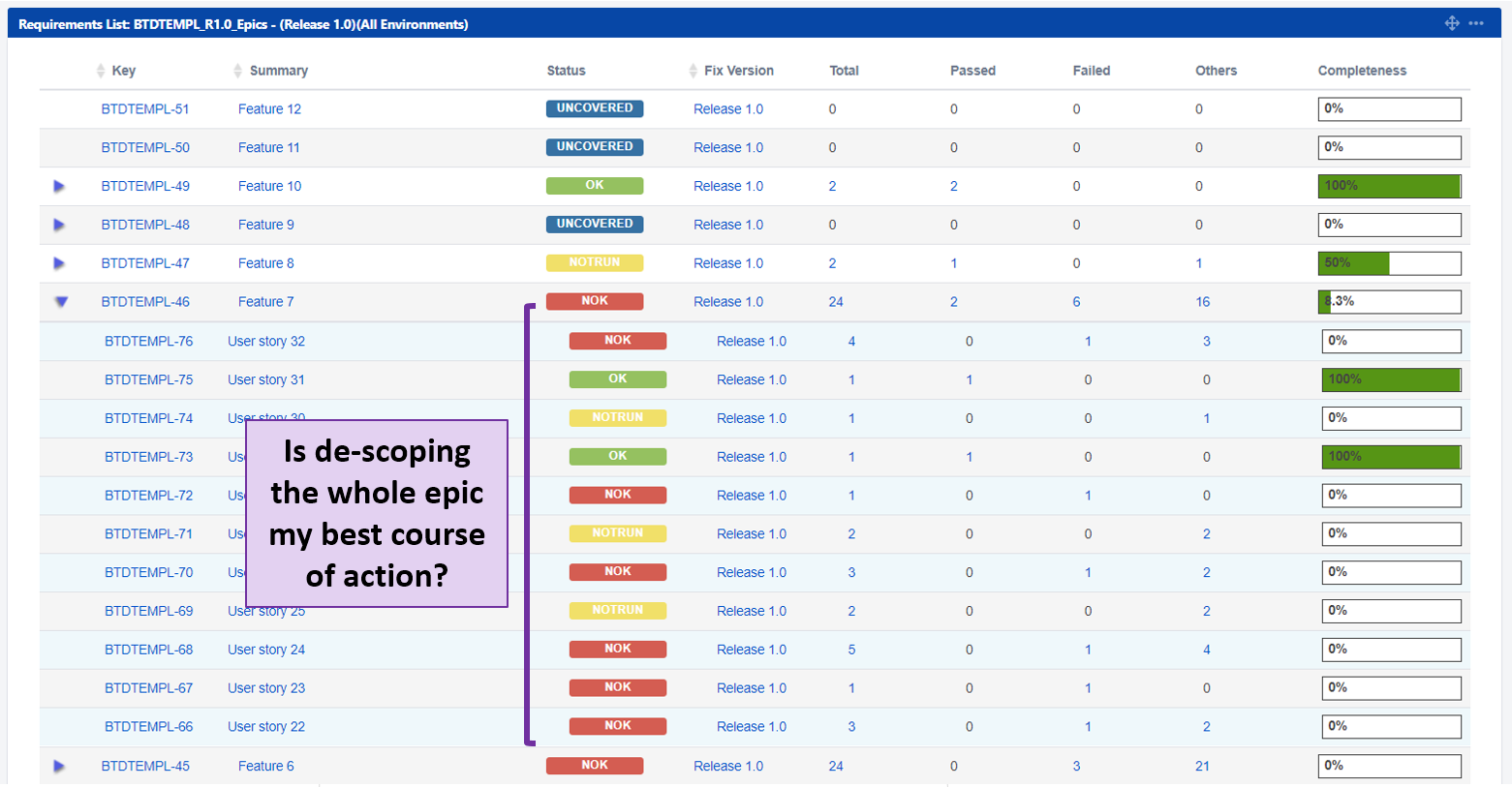
When an epic has many stories with failed test cases, it is often worthwhile to consider descoping the whole epic, unless there is plenty of time of fix all problems and re-test. Descoping a large epic early can lead to better overall outcomes by allowing the team to focus on the remaining scope.
Being able to expand and see what is happening within multiple epics allows comparison across epics.
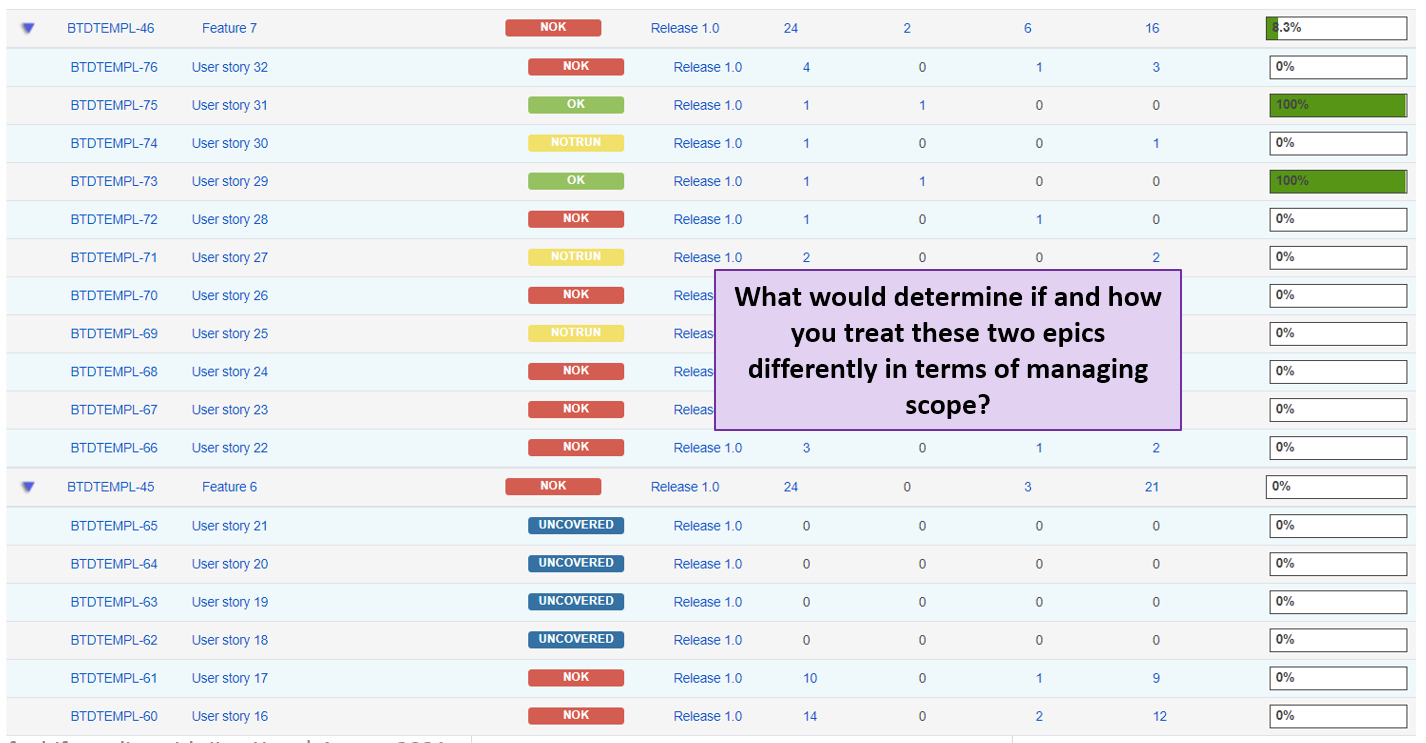
This report could be very handy particularly if you are interested to compare epics to decide which ones to try and progress and which ones to descope.
Xray does an excellent job of test management with the advantage of being fully integrated within Jira. It comes with standard test reporting for enabling and managing quality. And then it also has additional reports that can help with end-to-end delivery management. So using Xray only as a test management tool is under-utilising its capabilities!
The Historical daily requirement coverage and Requirement list reports allow you to track progress across the delivery lifecycle and maximise the ROI from Xray and Jira.
Disclosure: The author is not affiliated with Jira or Xray and does not have a commercial agreement with either, although that would have been sweeter! If you have a question or would love to have more how-to type of information, please feel free to connect on LinkedIn and drop a note with your suggestion.
Photo credit: https://unsplash.com/photos/unRkg2jH1j0
Posted under: Atlassian Jira, High Performing Teams, Agile Delivery Management, Scaled-Agile
The Atlassian suite that includes Jira and Confluence enables traceability as a super-power for agile teams.

Learn how to improve collaboration, visibility and performance within your teams using JIRA.

Establishing and enabling high performing agile delivery teams require bringing together expertise and skills in multiple problem spaces.