
Traceability is dead, long live traceability
The Atlassian suite that includes Jira and Confluence enables traceability as a super-power for agile teams.
Learn how to improve collaboration, visibility and performance within your teams using JIRA.

Tools such as Atlassian JIRA make remote or distributed working easier by providing a centralised view of work. Here are seven JIRA tips to make remote working more effective within your agile teams. These are based on my experience working with distributed teams for several years even before COVID.
Even if you do not use JIRA, you may be able to adapt the ideas for your team’s collaboration tool of choice, be it Asana, Monday or anything else.
Many teams do stand-ups based on the following 3 questions:
However stand-ups could be more than status updates and notifying about blockers.
Start thinking of daily stand-up as the best time when everyone on the team gets together. Maintain the focus on the quality of the interactions and how they facilitate collaboration within the team. It is in this sense you may need to revisit social rules that might be constraining the ability to work and solve problems together. For example, if your team has a 15-minute time limit for stand-ups but always need to rush through it, would it rather help to extend it by another 5-10 minutes, atleast for a while?
Based on my experience with multiple teams, this one is an absolute game changer.
Many teams prefer doing stand-ups by going around the room or using swimlanes based on the Assignee. Instead of this, experiment changing the swimlanes to be based on epics. The team will then go from the top of the board, going epic-by-epic with members providing updates for cards related to the epic.
If it sounds very strange and different, the reality is that it actually is. And it takes a few days for the team to get used to this way of doing standups. However, the benefits are worth the change.
Stand-ups with the epic view provide automatic context for every conversation, improving the team engagement and making it easier to collaborate. For cross-functional teams, this provides team-wide view of features helping to talk about dependencies and integration aspects on a regular basis.
When defects are managed within the epic, this also alllows defect prioritisation and assignment to happen as part of stand-ups, rather than in separate meetings.
There is nothing better than epic-based stand-ups to improve collaborative problem solving on a daily basis, helping the team progress faster than ever. Moreover, the epic/feature provides an integrated view of the delivery across all component systems. So this view helps the team visualise what is required to complete a feature.
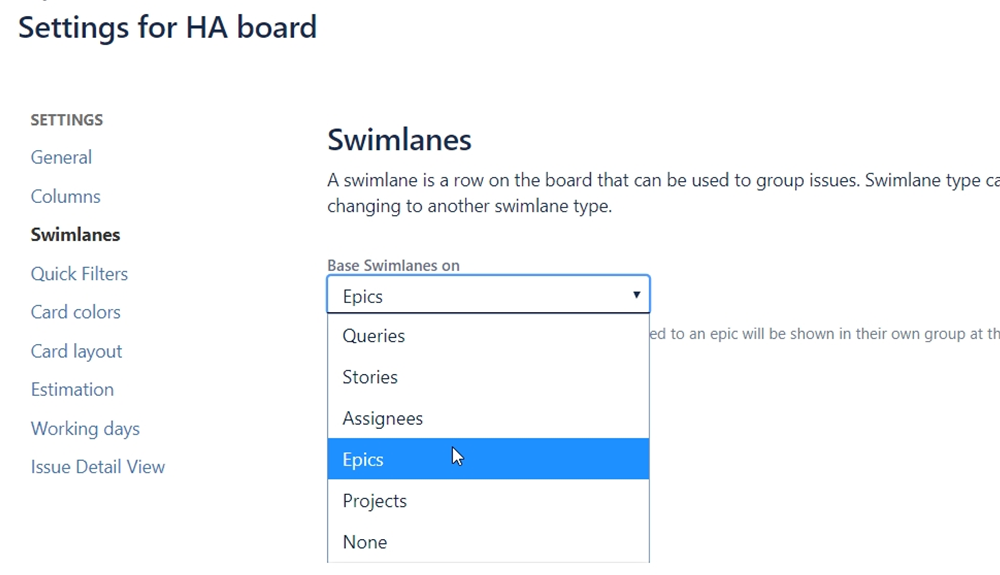
Have swimlanes based on epics
If your team doesn’t practise agile work breakdown with releases and epics, may be this is a good reason to consider it!
When epic view is used for the stand-up board, the epics are actually prioritised according to rank. This is powerful because it provides automatic visibility of priority to the team. If the most common question within your team is “what should I do next?” then prioritised epics would be your biggest friend.
The actual prioritisation of epics can be done by dragging epics up and down on the backlog view. Remember that epics may need to be re-prioritised at the beginning of every sprint.
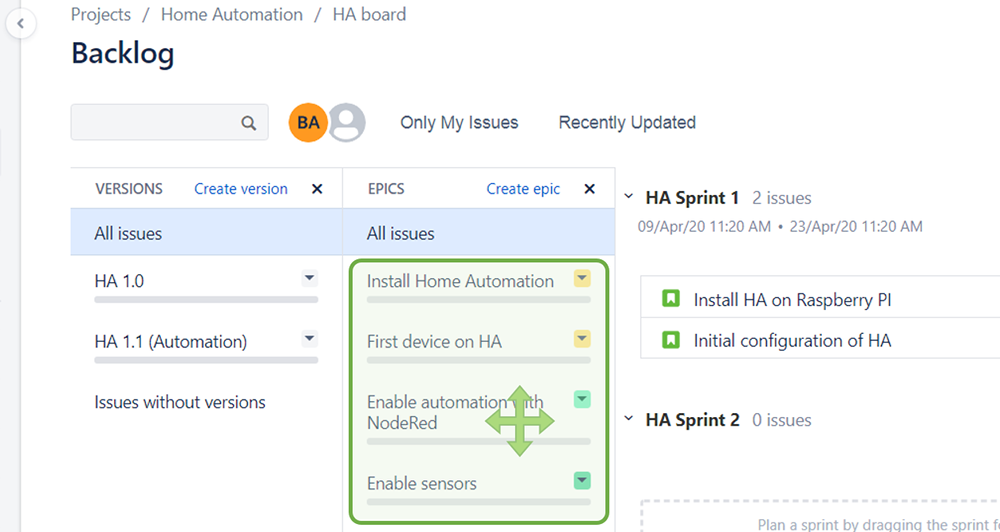
On the Backlog view, drag and move epics up and down to change the priority rank. If you use a Kanban board, enabling the Kanban backlog enables the epics (and fix versions) to be visible in the backlog view.
This tip improves on the previous one to provide a quick filter that shows only the unassigned items on the board. Depending on how your team is organised around skills and flow of work, you could add additional filters based on status, components or other fields.
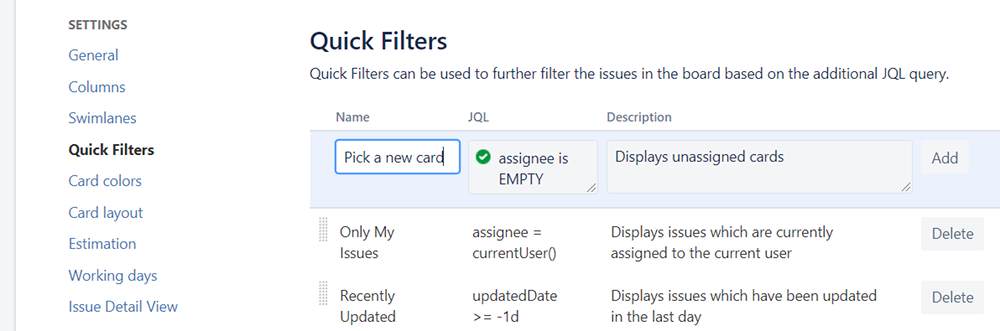
Add a quick filter to help team pick new items to start working on
Using comments in JIRA brings the collaboration closer to the work-item and automatically provides context and history. Practise end-of-day comments which summarise what you have completed and what is remaining. These are powerful for handovers or status changes. Also this can potentially reduce a lot of status update meetings as Jira can be referred to understand what is happening.
For external conversations related to work, make it a habit to copy email or chat conversations into JIRA, so that all conversations are captured in one place.
Remember that you can @Mention team members to ask for specific help or provide specific instructions and comments. This can allow email notifications to get attention or to help solve problems.
JIRA has a "watch this issue" feature that allows you to receive notifications when the issue changes. This is the easiest way to stay on top of updates.
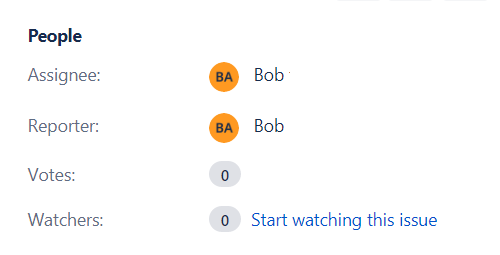
Add a watch to issues that you wanted to be notified on
Did you find any of them worth trying out? Also, what are your favourite tips for remote working teams?
Image credit: https://unsplash.com/photos/YUuSAJkS3U4
Posted under: Remote Distributed Working, Atlassian Jira, High Performing Teams
The Atlassian suite that includes Jira and Confluence enables traceability as a super-power for agile teams.

Jira Xray Tutorial: Discover how the Xray add-on can provide an easy approach for agile delivery management with Jira. Plus a rare opportunity to hear me rave about a tool!

Establishing and enabling high performing agile delivery teams require bringing together expertise and skills in multiple problem spaces.